
Offtop
Product Design
2025
Guiding music producers to their ‘aha’ moment, 15% faster
Role
Product Designer & Product Analyst
Team
Designer, Founder
Tools
Figma, PostHog, Snap AI
Timeline
1 week
Platform
Desktop
A week-long design sprint for Offtop, an early stage music tech startup resulting in a 15% lift in target activation metric. Offtop is a file management platform for music producers focused on organizing and sharing beats, loops, and stems.
Target users: Professional music producers
Problem & Context
How might we get more users to create packs (groups of tracks) in their first session?
At Offtop, the ‘aha’ moment occurs when a user shares their music. To get to that point, users must first create a pack (like a folder). While digging into conversion & activation funnels, I discovered a large drop-off at a key step in the our activation flow: creating a pack. Only 26% of new users create a pack— significantly undercutting the potential of sharing and thereby experiencing the ‘aha’ moment.
Upload a track
1
Only 26% arrive here
Create a pack
2
These users are 2x more likely to convert
Share a pack
3
Drop-off visualization
Stakeholder alignment
Before starting my designs, I spoke with the founder to align on goals and constraints for this project. From our conversation, I decided to only focus on designing small UX tweaks to create a 10% lift in the pack creation rate.
Project constraints
1
No net new features
2
Solution can be built in a day
3
One week deadline
Measuring success
10% lift in the number of users creating a pack after uploading for the first time
Research & Mapping
Identifying a high-impact area for improvement
By mapping out the activation flow, I observed that if a user creates a pack at the upload window, the path to sharing a pack is much shorter. This led me to focus on optimizing the upload window to maximize the number of users who create packs at that step.

Activation user flow

Producer Empathy Map
After reviewing existing research through an empathy mapping exercise, it became clear that users were excited by the look and feel of the product but felt confused and uncertain during initial exploration. The logical next step isn't always clear.

Insightful stickies from mapping exercise
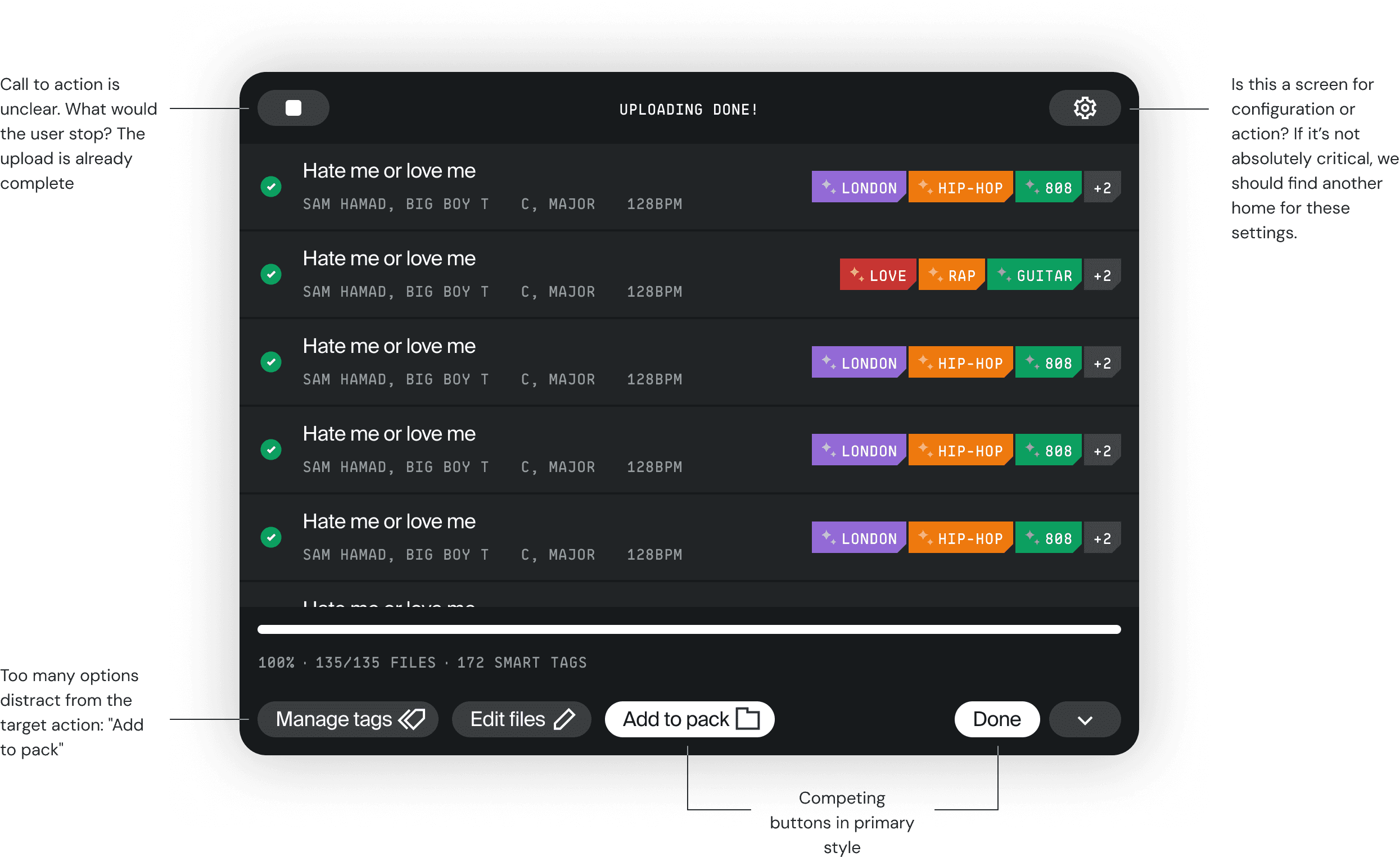
Lastly, I audited the current upload window. My takeaways from this exercise:
1
Too many paths for the user to take is distracting them from the main one
2
Architecture of window needs to be reevaluated for clarity
3
Competing buttons in primary style cause distract from the screen's primary purpose.
Audit of current product
Exploration
High-fidelity iteration
Armed with these results, I moved to an exploratory phase, addressing the problems I observed in earlier exercises. Given the time constraint, I worked primarily in high fidelity screens. Here are some options I came up with:
Bottom bar
This, I felt, was the primary source of confusion. I focused on optimizing button placement & hierarchy, starting with removing the "Done" button from this section so it wouldn't compete for attention, being in primary style.
Before

After

Progressive disclosure & tertiary-style collapse button work together to reduce cognitive load and clearly point users towards target button.
Top bar
Given that I moved the "Done" button away from the target CTA, I had to make it work on the top bar. After a conversation with stakeholders (company founder & lead developer) I decided to remove the settings button from this modal. It would work in another area, and here it was distracting.
Before

After

Target CTA text
At this stage I wondered if the target button itself could be improved. The phrasing, "Add to pack," might not resonate with users who haven't created a pack yet or don't know what a pack is.

No change
Although I felt "Create pack" would be the best option for new users, this option excludes the potential to add uploads to an existing pack (something that users will do after their first time uploading). Given this state handling would have introduced unnecessary complexity, I could not to make this change.
Honing in
Testing my solution with AI

AI Tool: Snap
AI prototype testing
Once I decided on these three changes, I needed to validate my thinking. Due to limited time, I used an AI prototype testing tool called Snap to have AI agents interact with my Figma prototype. The program yielded these results:
1
Users still uncertain about primary intended action due to competing buttons.
2
Users did not understand how to dismiss the post-upload window.
"The inability to dismiss the post-upload screen and explore the application freely made the workflow feel overly prescriptive."
Based on these insights, I determined that "Done" isn't a clear enough description of the "close" action & it was competing with the target CTA: "Add to pack." To address this problem I changed the "Done" text button to be an exit icon.


I made the suggested changes and ran the updated prototype through a final round of AI Agent testing. The agents found the final screen intuitive and target action identifiable. With validation from AI I was ready to move forward with the changes and hand off to a developer.
"Most users correctly identified the 'Add to pack' button as the intended and logical next step in the workflow."
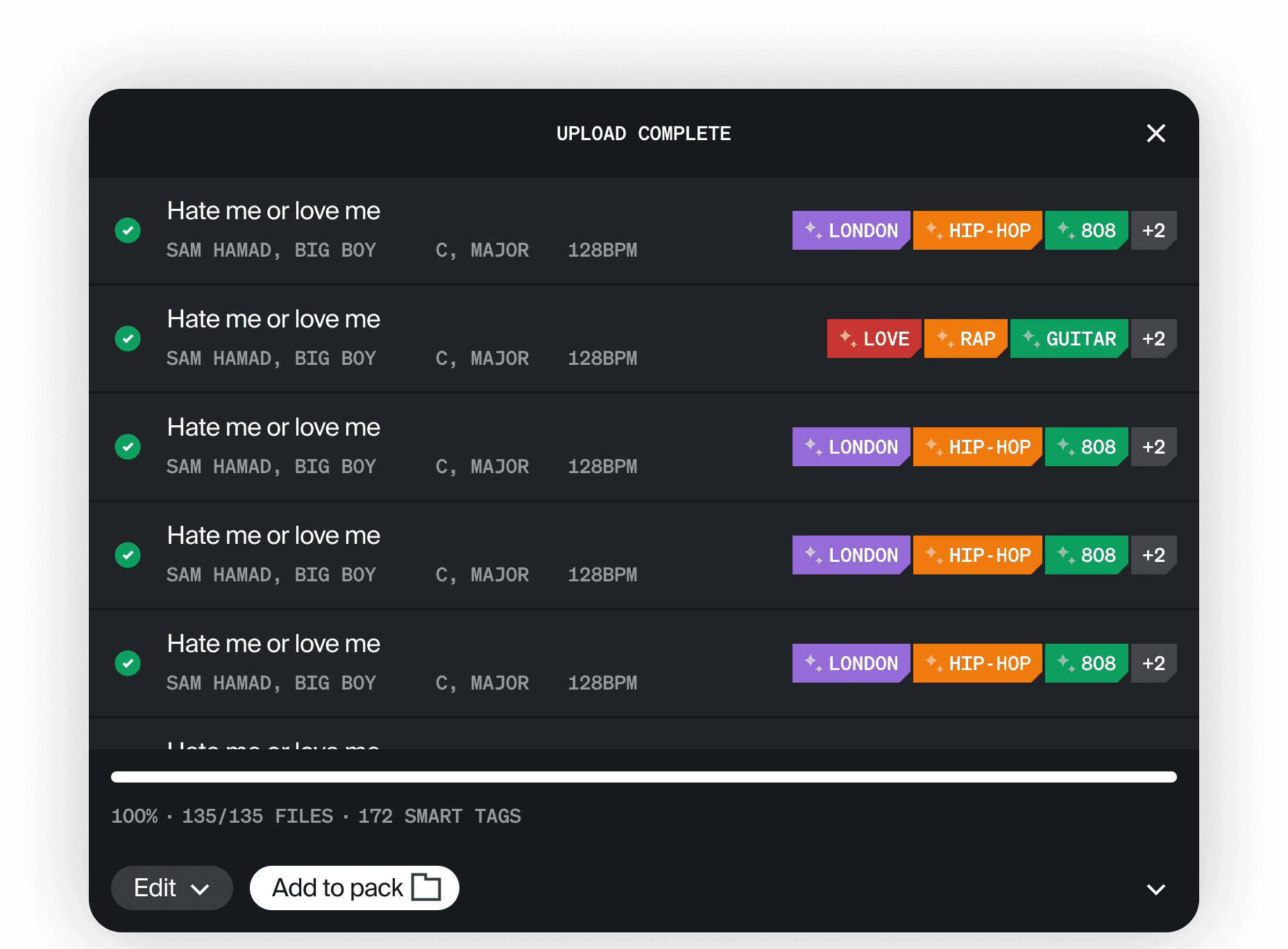
The final version
Solution & Impact
Surpassing business objectives
While my designs were live, I was able to measure their impact. With just these changes, we saw a 15% lift in the target activation metric, surpassing the initial objective of a 10% lift.
Before
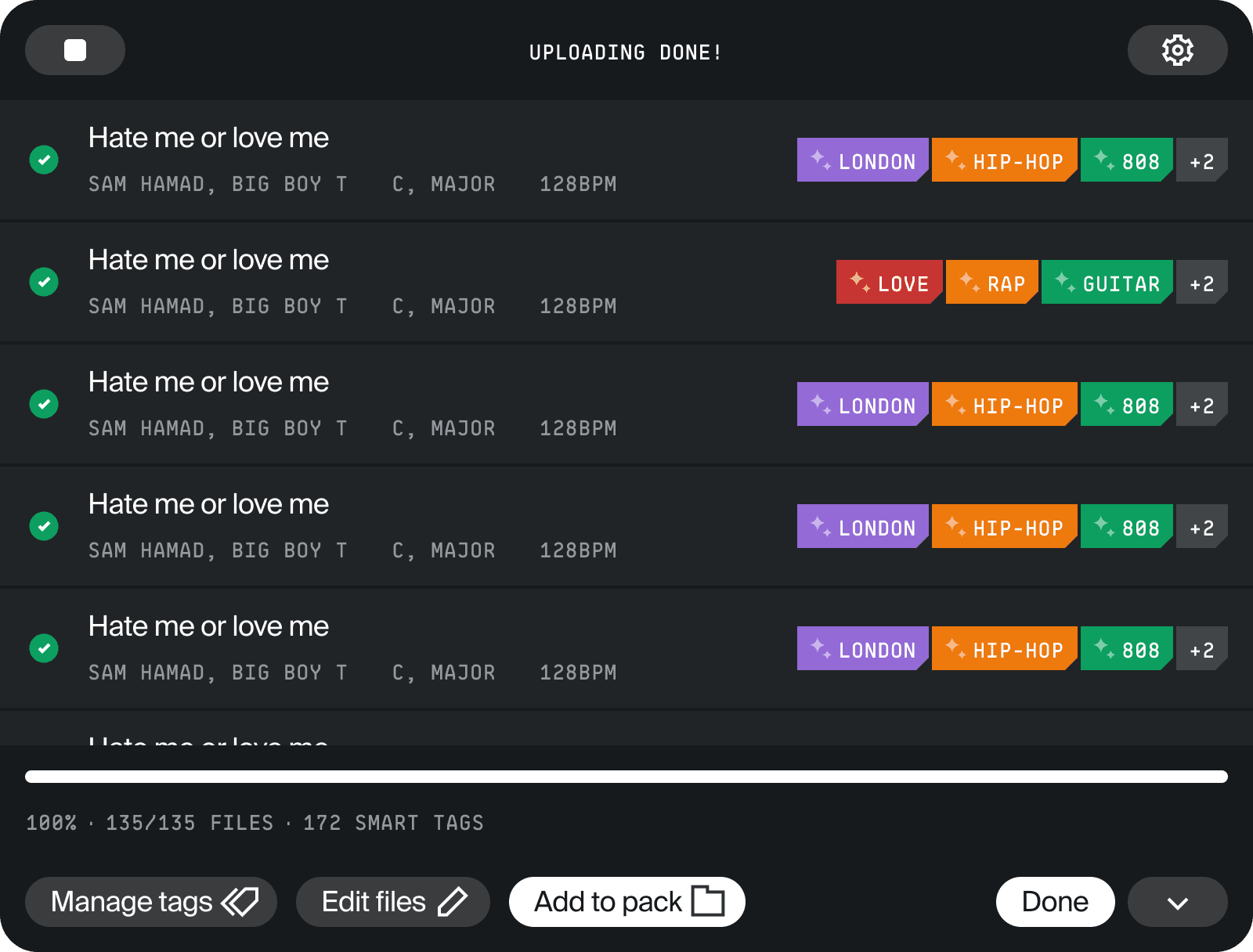
After
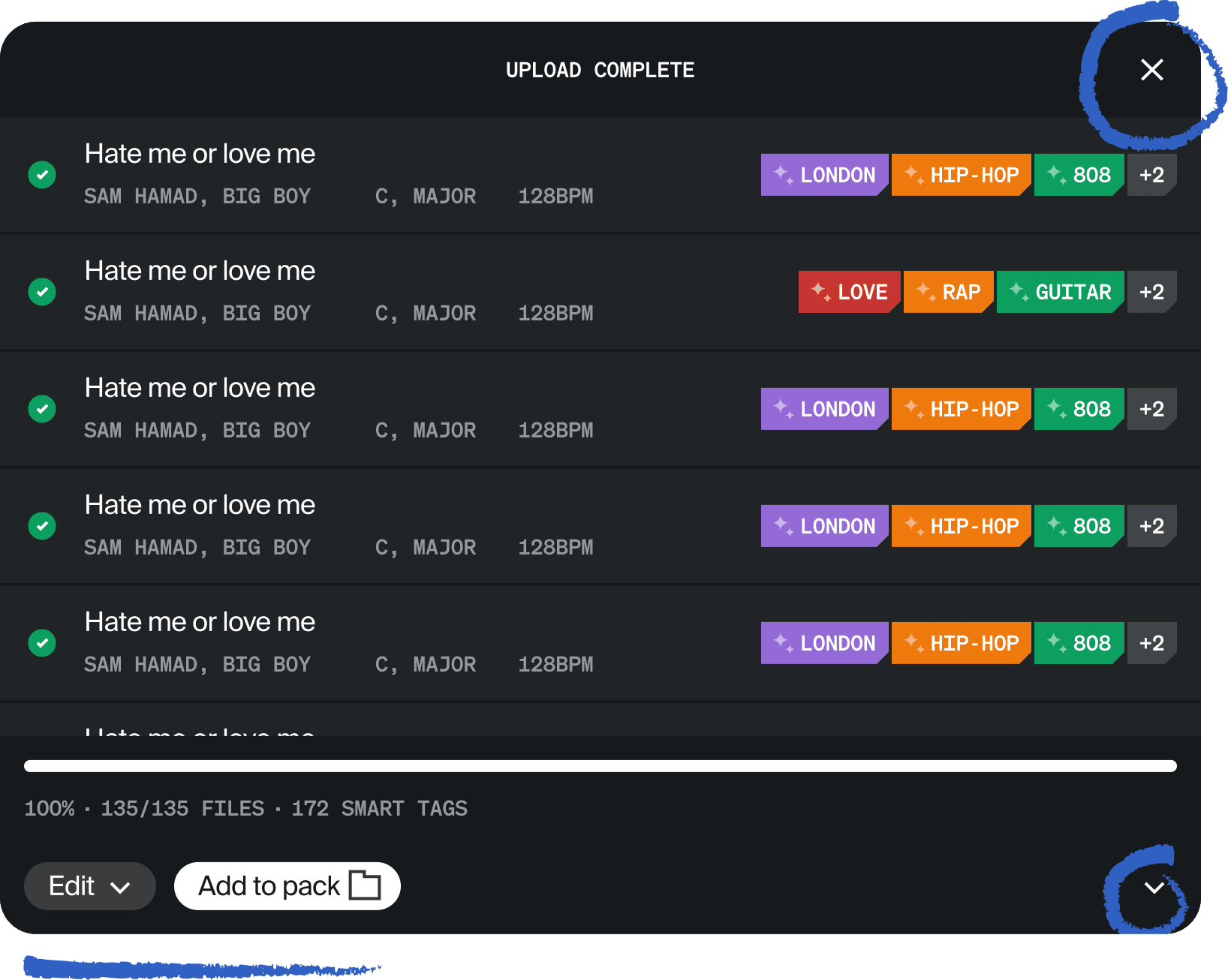
Impact
Increase in activation via creating packs after implementing the improved upload window.
The target metric was the conversion rate from uploading a track to creating a pack within 24 hours. Before my redesign, this metric was at 26%. After implementing these nuanced design changes, the conversion rate grew to 30% (about a 15% total lift of the original conversion rate).
Reflections
Lessons & takeaways
Working within constraints: This project was as much about restraint as it was creativity. With tight timelines and development limits, I had to resist the urge to redesign. By staying within the existing design system and focusing on what was feasible, I learned how to prioritize impact over novelty and manage my time to meet the deadline.
Less is more: Improving a screen that already looked polished pushed me back to UX basics. Research and small, subtle changes helped improve how the screen worked without making it feel unfamiliar to users. These minimal updates were easy to track and ended up driving meaningful business impact.
Final design